How To Stop Gmail from Blocking Outlook
Reasons Why Gmail isn’t Working in Outlook
Before blaming Google for this issue, there’s something you can try first, especially if you set your account up using IMAP. Try to add your Gmail account to Outlook once again, but pay careful attention when entering the server settings, which look like this:
- Incoming server: 993
- Incoming server encrypted connection: SSL
- Outgoing server encrypted connection: TLS
- Outgoing server: 587
The trick here is to choose TLS in the Outgoing server encrypted connection menu before typing ‘587’ in the Outgoing Server. If you do it the other way around, the 587 may revert back to Port 25 which can cause connectivity issues.
If after doing this, Google still seems to be blocking Outlook from accessing Gmail, then you will need to change some settings in Google, not in Outlook. Google claims that this is done for the safety of your account, but it seems to me that Outlook shouldn’t necessarily be on the list of risky apps.
How To Let Outlook Access Your Gmail Account
You probably received an email from Google with the subject title “Sign-in attempt prevented”, which should look something like this:
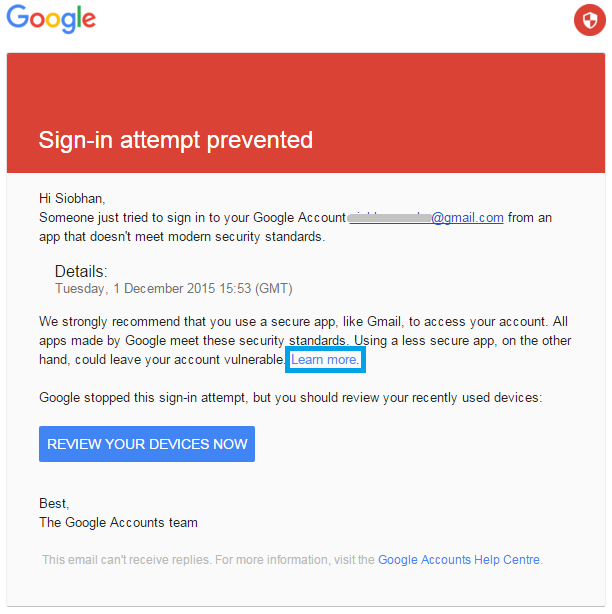
Click the link “Learn more” inside the email to be taken to a support page explaining limited access for less secure apps.
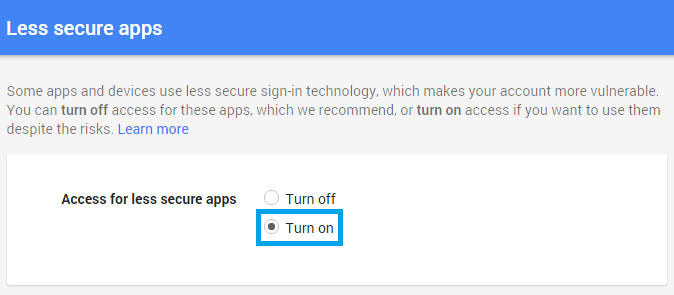
Under “Change account access for less secure apps”, click the link to the “Less secure apps” to open your Gmail account access settings. On this page, simply select “Turn on” from the two options. Your account will automatically be updated, so you can simply close the window afterwards.
If you are using Outlook 2010 and find that your Gmail is not connecting at all, please make sure if you are using IMAP that you disabled POP3 and enabled IMAP in Gmail. If you continue to have issues then check what add-ins you may have for Outlook that could be interfering with your connection. You may also want to try to delete and then add the account again, making sure all access is allowed on both ends (both Google and Outlook).