

All posts tagged with Email.
 How to Use Focused Inbox in Outlook Focused Inbox is a feature that aims to help you focus on emails that are the most important to you. It does this by automatically sorting your emails…
 How to Recall an Email in Outlook 2016 Recalling an email in Outlook 2016 allows you to retrieve and replace an email that has already been sent. Here are the steps to do it:
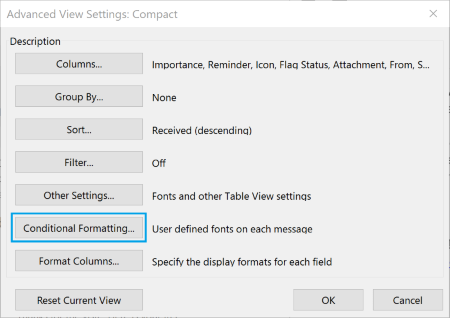 How To Color Code Emails in Outlook 2016 Conditional formatting is the feature that enables you to color code your emails. It will let you distinguish messages from one another by displaying emails in various forms…
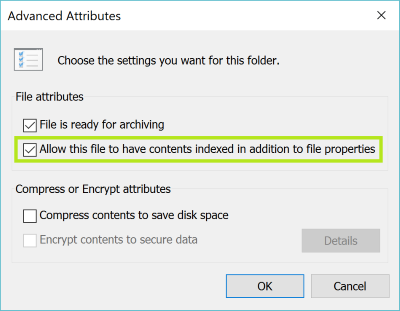 How To Fix Outlook 2013 Search Problems You’ll probably see a message that says “We couldn’t find what you were looking for.” There’s also a chance that you can see very few results, and if…
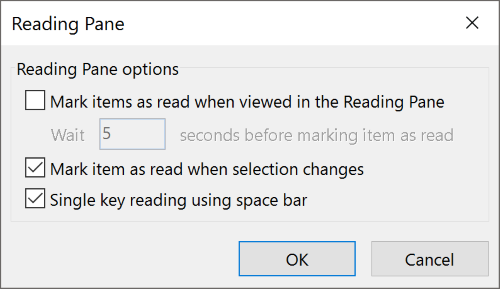 Save Time with Single Key Reading Single Key Reading is just a simple and quick way to read and scroll through emails in your inbox. Why is this so efficient? Well, using this space…
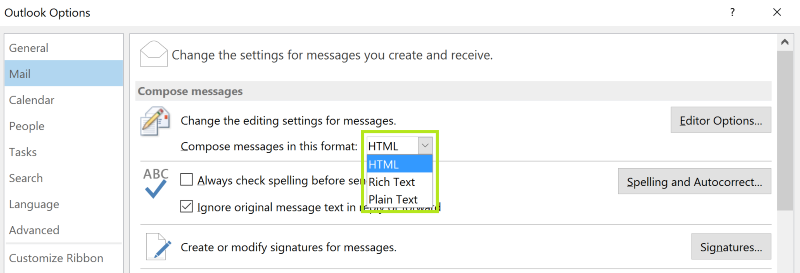 How To Prevent Outlook from Sending Winmail.dat Attachments Mail programs all handle email formats in different ways. When messages are sent from Microsoft Outlook or Microsoft Exchange Server, there is a chance that the recipient will…
 15 Outlook Tips & Fixes to Help You Save Time The first thing to know about Outlook is that eventually you will run into search problems. It’s pretty much a given, and while you can try to do…
 Outlook Email Management 101 If your answer is yes, then you’re not alone. The average office worker in 2015 received about 122 emails on a daily basis, and that figure only seems…
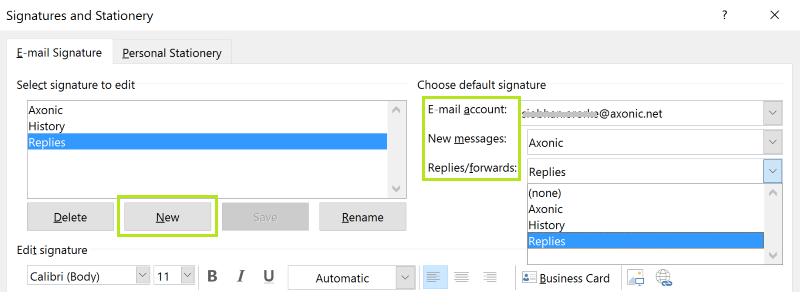 How To Add Email Signatures In Outlook This could give the recipient an easy way to write a new email to you without hitting reply. Keeping your email address in the signature will allow someone…